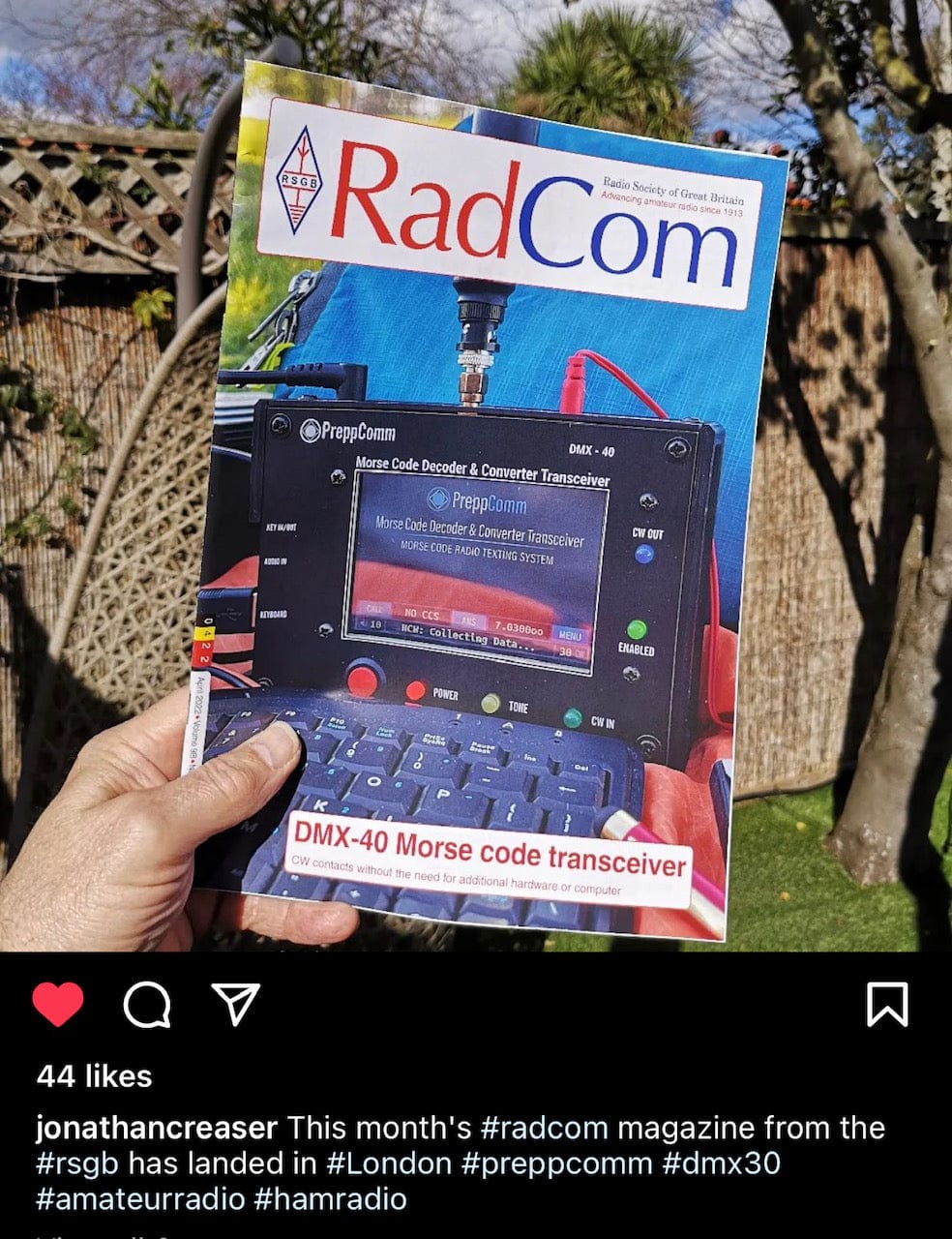
DMX-40 Morse Code Transceiver

Skip to product information
1 of 7
Regular price $229.00USD
Sale price $229.00USD Regular price
Condition
Product Bundles
DMX Bundle
DMX Complete Bundle

Overview

The Original Morse Transceiver!

It's a ZERO Plus! Just a ZERO with the added feature of a built-in transceiver! Does EVERYTHING a ZERO does, and 40 meters QRP as well!

Introduced in 2020, this was the beginning of the Morse Revolution! Improved numerous times over the years of its life, it continues to be popular and at a very attractive price as a transceiver and computer in a small, lightweight, and portable low power communications system running off of 12V. Based on many customer reviews, emails, and phone conversations, we can claim to have the best decoder in the universe, backed up by hundreds of hams around the world who have tested it against everything out there!

Available in new and refurbished models

Refurbished DMX-40's are in excellent "like new" condition, with any scratched panels replaced. Visible damage is essentially non-existent or difficult to find.

There is a limited supply of the refurbished DMX-40's available, and more become available from time to time. If you see "SOLD OUT" when you visit our Refurbished product page then check back another time.

DMX-40 Overview

The DMX-40 comes with its own keyboard, protective lid, touch-screen cleaning cloth, and a screw-adaptor plug for connection to a 12 volt battery. It is a mere 11 oz of integrated electronics, including three powerful microprocessors, plus a 3-watt QRP transceiver. One microprocessor is responsible for the graphical user interface (GUI), while the other handle the many tasks required to produce an amazing experience for the user. No computer required - built in! All you need is a 12V power source, an antenna, a powered speaker or headphone, and the included keyboard and you are ready to join the CW revolution!

Details

  • World’s Best CW Decoder! Decodes in Noise!

    We are not just blowing our own horn here: it is our customers who tell us this, based on thousands of hours with hundreds of locations and users all over the globe, who have compared the DMX-40 decoder with everything else out there! The tell us nothing beats it! The decoder is based on a combination of analog and digital signal processing to separate the signal from the noise, and can on occasion decode a signal you can’t even hear under the noise!

  • Great Technicians: Get on HF!

    The DMX-40 is the perfect solution for technician class licensees for getting on the HF bands, without having to learn CW first! Start out by merely texting, and using the built-in QSO automation, and grow from there, using our powerful RPL (Rig Programming Language) to customize the rig to your specifications!

  • Give Your Teen Something Fun!

    The DMX-40 is great for teenagers! Get them off their social media, and onto World Media, via ham radio! It will train their brain from the crazy thinking today into a strong, logical thinking process, and it will be tremendous fun, looking for that contact in a distant country, or finding a friend in Europe, South America, or the tropical islands!

  • Learning Code? Or just Texting?

    The DMX-40 is the absolute best training tool for learning Morse code. Utilizing "Cognitive Association" for learning to hear incoming code and translating each character and word automatically in your head happens after only a few months by listening and watching the code appear translated into text on the LCD. Of course you are already doing this - so there is zero work involved - just happens: your brain learns. Our customers tell us after a few months, they start thinking the character in their mind before it shows up on the screen. Effortless learning!

    For sending, use the key to send to the decoder, in Receive Mode. The decoder processes this as if it is another station, and tells you what it thinks you are sending, and the speed you are sending at. Much better than just listening to your code. And of course you can hear the code as well on the DMX-40 headphone out.

  • How About Advanced Hams?

    You might think that a product like the DMX-40, which was designed for emergency situations (hams use CW to get out in emergencies because it gets through when other modes don’t) would not provide anything useful for an advanced ham operator. WRONG! Many operators can copy 15 to 20 WPM but can’t copy 30, for example. Some have tried to learn CW but have failed, for many reasons. Others have physical limitations that make it difficult to use a key. The DMX-40 provides a solution for all of these cause and more. The powerful RPL microprogramming language enables an advanced ham operator to extensively customize the automation of the DMX-40 for contests, net control, and general operation according to their particular operating style.

  • DMX-40 Summary

    The DMX-40 has something for everyone! At a very affordable price, and an even more affordable price for an almost new Refurbished unit! You can’t get features like this anywhere else, and the price is a great inflation fighter! The DMX-40 price has survived the Biden Inflation and remains at the same price it was at in 2019!

    KEYBOARD IS INCLUDED, as well as a small set of wired earbuds!  Also check out our DMX-40 accessories!

    NOTE:  The DMX-40 DOES NOT SUPPORT PLUG-IN BAND BOARDS!

  • DMX-40 Bundles

    To make it easier to purchase the DMX, we offer 4 bundles:

    1. The DMX Bundle: this includes a stand, dummy load, cable adaptor, and cable assembly
    2. The DMX Complete Bundle: to #1 above we add a powered speaker, A/C USB power block, 5V to 12V cable, audio cable, and USB cable for a truly complete setup
    3. The DMX EMP Bundle: To #1 above we add an EMP Shield zip-lock, a roll-up keyboard and cable, and an interior canvas bag for the DMX to protect the EMP Shield from sharp corners on the DMX
    4. The DMX EMP Complete Bundle: To #2 above we add an EMP Shield zip-lock, a roll-up keyboard and cable, and an interior canvas bag for the DMX to protect the EMP Shield from sharp corners on the DMX. We also add a second EMP Shield bag to protect the speaker, USB Power Block, and 5V-12V cable, all of which have sensitive electronics within them

    Download Data Sheet      DMX-40 Videos      DMX-40 Review

Product Videos

Video 1: Introduction to the DMX-40

Since the MMX is just a DMX-40 with band cards, the DMX-40 videos are very helpful and on-target for learning about the MMX: DMX-40 Videos

This is the first in a series of 8 videos designed to give the viewer a overview of the operation and function of this very unusual transceiver. Unlike most transceivers, the interface is a keyboard and a color touchscreen. Its operation is unique – it has no direct competitor.

This series will help you understand what makes this product a very attractive option for a radio operator looking for an opportunity to operate on the HF bands with Morse Code without having to learn it first. The DMX-40 will help you learn, if that is your goal, or it will allow you to operate on 40 meters (or any other band if you have a base station) with only a Technician Class license and no knowledge or experience of Morse Code. It enables infrastructure-free communications alternative for preppers bound to a fallible repeater with their handheld VHF/UHF transceivers. Fun to use, powerful 3-microprocessor automation and power!

Video 2: Transceiver Setup and Typing Speed

This video covers the initial setup steps that are needed prior to operating a DMX-40 transceiver. Initially, in the Local Station Setup option from the Main Menu, you enter your call sign, your handle, your QTH (location), rig (usually the DMX-40 unless you are operating with a base station. In that case, the base station transceiver), your antenna, and finally your license level.

This information is used to set your call sign, to load the “INFO Macro” for sending your information to other stations with a single keystroke, and to set limits on your allowed transmitter frequencies, based on your license. This means you can’t transmit accidentally where you are not supposed to.

The typing speed system enables you to set your comfortable typing speed, so you can keep ahead of the transmitter while using the outgoing type-ahead buffer. This allows you to correct typing errors before they get transmitted, and annoys the transmitter to send perfect code. Without the type-ahead buffer and speed control, you could be in the position of starving the transmitter and thus messing up your transmitted code timing.

Video 3: Help System, Gain Controls, and LED Functions

In this video, we explore the built-in Help System for the Receive and Transmit Mode. Additional help is provided via printable keyboard layouts in the Reference Manual Appendices.

The DMX-40 has two digital gain controls: one for the headphones, and one for the Morse Code decoder. Both are controlled via the keyboard, as shown in the video. Finally, the function and operation of the receiver and transmitter LED’s is presented.

Video 4: Receiver Tuning Controls and General Calling (Calling CQ)

As you can see from the photos, this transceiver does not have a tuning “dial.” Rather, it uses the keyboard 4-way controller to control the tuning of the receiver. The left-right arrows control moving up and down in frequency, and the up-down arrows control the step size, from 1 Hz to 10,000 Hz steps. To enable you to keep track of your step size, the display shows small zeros indicating your steps. Thus, for example, a step size of 100 Hz will show two small zeros, as in 7.0300oo, for example. Using the auto repeat function of the keyboard, it is very easy to do a band scan.

The CALL button has 3 states: BLUE = not calling. RED = repeated calling CQ with your call sign. AMBER = completing the current repeat and then ending the call with a single K for “come back.”

Calling is a very simple procedure: Press CALL once to start, press it again to start the ending process. And then listen for a response!

Video 5: Directed Call and Answering

Besides calling CQ, you also will want to be able to call a specific station. This is accomplished using the same CALL button, but with an important difference. The “NO CCS” spot between the CALL and ANS (Answer) buttons is actually a button, as well. CCS stands for “Captured Call Sign.” There are two primary ways for a call sign to be “captured” by the system. This call sign is essentially the “other” station you are listening to or want to call or answer.

The first way the CCS can be captured is via the receiver decoder. When the receiver sees the proper sequence of characters from the receiver containing the call sign, it is recognized and then appears automatically by replacing NO CCS.

The second way is for you to touch the NO CCS button, and enter the call sign of the station you want to call or answer from the keyboard. If there is a station call sign displayed in the CCS button, when you press the CALL button, you will get a Directed CALL to that station. Otherwise, it works just like the General Call. Clearing the CCS button is accomplished by touching it.

Video 6: QSO! An Example of An On-Air Conversation

The previous five videos have covered many basics. Now, let’s demonstrate how it all comes together in a sample QSO. A QSO is “ham talk” for a conversation over the air. In this video, we have a very short conversation with another station, demonstrating the use of the VALIDATE-ANSWER function.

Both the CALL and ANS buttons have two functions. In the case of the CALL button, it is General CALL and Directed CALL. For the ANS button, it is Validate-Answer and Answer,.

Validate-Answer is used when you need to establish a two-way communication with the other station. Note that if you do a call, and another station answers, you have, by definition, a two-way communication established. After all, they heard you, and you hear them. When answering someone else calling, or trying to call a station via the ANS button after they have completed a conversation with another station, you only know you can hear them. The Validate-Answer function is used to find out if they can hear you, in a quick and painless manner.

Watch carefully in the demo as the receiver decoder captures the call sign of W2OL and automatically puts it into the CCS button. Pretty cool. No longer having to remember their call, write it down quickly, mess it up and ask for it again… Like I always had to do…

Video 7: Frequency Memories

There are ten frequency memories available on the DMX-40. But how they are available and how the editor works is quite interesting.

First of all, there is a Frequency Memory List. This is accessible from the Main Menu, but is also available using the F key. F pressed twice gets you back to the Main Screen. Of course ESC also does that… The list shows all ten of the memories, either by label or by frequency (your choice). Or blank, if nothing has been set. There is also a EDIT button next to each. But you can also “execute” a frequency memory by touching the frequency or label. In other words, you can “load” the VFO (Variable Frequency Oscillator) with the value by touch.

There are also keyboard shortcuts. Pressing a digit from 0 to 9 also “executes” or loads the VFO with the stored frequency. Shift-number goes directly to the editor for that memory.

The Frequency Memory Editor allows you to use your current frequency, or any frequency within the tuning range of 4.9 to 10.2 MHz you enter from the keyboard as the value to store.

Pressing the right arrow key moves the blue rectangle – indicating where the keyboard is active – to the memory label field. Up to 9 characters can be typed for the label. If no label is used, the frequency is displayed in the field.

Hit STORE to save. the current value, CLEAR clears the current value so you can type a frequency, or you can just hit backspace to delete the current frequency before you enter the desired frequency. Very easy to use, very effective. The Frequency Memory List is useful for those of us who can’t remember which number we put that net frequency in when we need it…

Video 8: Microprogramming: Customizing & Expanding the DMX-40

The DMX-40 has 3 built-in microprograms: the CALL button, the ANS button, and the INFO Macro. The INFO Macro allows you to send the typical information normally shared between operators, such as your name, location, rig and antenna. All from a single keystroke, the tilde (~) key.

Microprogramming allows you to customize how your DMX-40 operates. The microprogram system includes Help in the Help System, and a layout with a list and editor similar to the way Frequency Memories are arranged.

Each microprogram can have up to 60 characters, and uses the RPL (Rig Programming Language). This is a series of commands, typically single characters, that control the operation of the DMX-40. This includes substitutions, function calls and inserts, loops, timed loops, delays, and if statements, along with transmitter controls, and more.

The Starter Set is suggested to simplify your use of the transceiver in many different situations. Of course without them, you have basic operation just using the CALL and ANS buttons. But with the Starter Set, the BK abbreviation and ESC key, you have the ability to interact with other stations in a much faster “station ID free” mode (Station ID’s not required on every back and forth).

Going farther, you can customize your rig for net control operations, or contests, or other special cases, simply by creating your own microprograms. Appendix V in the Reference Manual describes all of the RPL commands.

Essential Accessories

Reviews

Customer Reviews

Based on 12 reviews
92%
(11)
0%
(0)
8%
(1)
0%
(0)
0%
(0)
m
m.h.

This transceiver is great it is made for the ham that don't know Morse Code it's also good for the ham tech class person,don't buy this if your not into Morse Code or don't like qrp low power comms you can put this in your backpack and go your way......

L
Lee

It's lot of fun!

D
Dennis Douglas
Almost but not quite..

This was my failing but I thought the DMX 40 also handled voice. And I thought it also did a few other bands other than the 40 band. My bad. I guess I was looking for a mountain topper with the little extra ability to decipher CW that was so fast that I wasn't able to decipher it. But as far as I can tell it's the 40 band Only and it does not support voice and it is a qrp as well. I will probably add this to my collection of stuff I don't use very often and it'll probably collect some dust on the Shelf before I get to the point where I can find a use for it. I wish it had an automatic internal switch forward and backward to send and receive automatically. Nope
oh and by the way nothing to do with the manufacturer the seller, more to do with my government but the import price if you don't send it by USPS ground is 1/4 of the price of this radio. I live in Canada. F... jt

We are sorry you were unaware of the specifications of the DMX-40, leading to your disappointment. I want to mention to you that the receiver does indeed receive AM short wave broadcasts as well as SSB on the ham bands, but the transmitter is limited to Morse code. We do have a multi-band version, the MMX. If you want to upgrade for the price difference, contact us using the Contact Us page. Regarding automatic transmit/receive, this function is included in the CALL and ANS (answer) buttons on the Home Screen. Note that we capture the other station call sign automatically, allowing automatic station ID’s as well. And, we regulate the transmitter speed to ensure you send at a comfortable typing speed, no matter how fast the other station sends. Finally, yes, I do not understand why UPS makes you pay duty that USPS does not. It is your responsibility to complain and get your money back from them. Good luck with that.

J
John Leonardelli
A great comms tool for QRPers and CW Operators

I was very impressed with the decoding capability and its QSO automation tools with scripts or just keyboarding capabilities.

I did make this purchase knowing I could use it with any radio or just as a stand alone radio

Leave the computer at home

My code speed has increased by watching the screen and forming the CW in my head as opposed to 45 years of written copy

R
ROBERT

Just as advertised.